Home | Projects | Classes Préparatoires (CPGE) | CV
Tips and Tricks Acquired in FIJI Image J
This is not a user guide for FIJI, the well known tool for scientific image analysis, but more a few tricks I learned and want to write down for posterity.
Basic use
- Import the folder, select Use virtual stack
- Tif images are faster to generate (microscopes generate tiffs)
- Highlight the pixels that vary the most -> Image>Stacks>z project>Standard deviation, puis l'image qui résulte tu fait Process>Enhance Contrast
- +- to zoom, space + drag simultaneously to pan
- Process>Image Calculator>Max for adding two images : they need to be taken in the same lighting conditions for this to work, or be black background silhouettes to use the >Add function
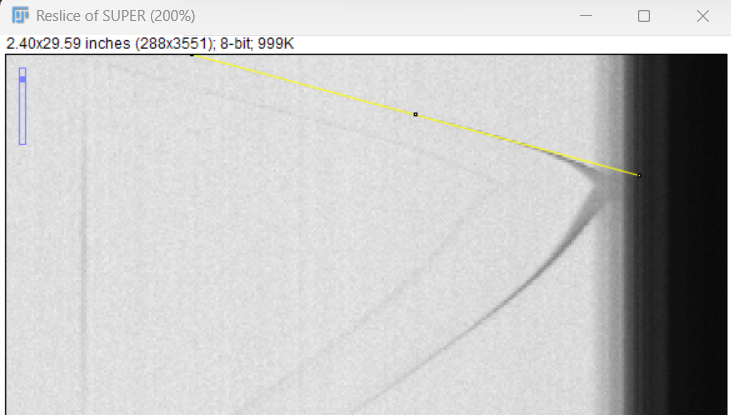
- Pour avoir la vitesse selon x il suffit de faire Image > Stacks > Reslice, puis la pente (si v constante) est proportionnel à la vitesse
- ALWAYS SET SCALE BEFORE PROCESSING
Short cuts
- crtl + c sets contrast (watch ou ctrl +s does smoothing, irrev)
- / does Z-slicing
- shift does straight vert or horiz lines
- tab changes between images/ stacks open (very useful)
- crtl + m measure
Macros
- F1 set scale from line of known length
- F2 scale bar (chose overlay to not bake in the scale bar)
- F3 enhance contrast
- F4 save as tif
- F5 Z project
- F5 reslice a line from frame i to j (via opening a new substack)
My macros
macro "Set Scale… [F1]" {
run("Set Scale...");
}
macro "Scale Bar [F2]" {
run("Scale Bar...");
}
macro "Enhance Contrast… [F3]" {
run("Enhance Contrast...");
}
macro "Save As TIFF… [F4]" {
run("Tiff...");
}
macro "Z Project [F5]" {
run("Z Project...");
}
// ----------------------------------------------
// Reslice a user-defined slice range, keeping
// the original straight-line (or rectangle) ROI
// ----------------------------------------------
macro "Reslice Chosen Slices – keep ROI [F6]" {
//––– make sure a ROI exists –––
if (selectionType() == -1)
exit("Draw a straight-line (or rectangle) ROI first.");
//––– remember the ROI in the (hidden) ROI Manager –––
roiManager("reset");
roiManager("add"); // index 0
//––– ask which part of the Z-stack to reslice –––
getDimensions(w, h, c, slices, frames);
Dialog.create("Slice range for reslice");
Dialog.addNumber("Start slice (1-" + slices + "):", 1);
Dialog.addNumber("End slice (1-" + slices + "):", slices);
Dialog.show();
first = Dialog.getNumber();
last = Dialog.getNumber();
if (first < 1 || last > slices || first > last)
exit("Invalid slice range.");
//––– duplicate only that range (note: plain stacks need range= ) –––
run("Duplicate...", "title=substack duplicate range=" + first + "-" + last); // :contentReference[oaicite:0]
//––– restore the ROI on this new window –––
roiManager("select", 0); // re-apply ROI
roiManager("reset"); // tidy up (optional)
//––– reslice along the copied ROI –––
run("Reslice [/]...", "output=1");
rename("reslice_" + first + "-" + last);
}